Our Automation — Source Migration: Bitbucket to GitHub
Our Automation
Table of Contents
- 1.1 Workflow Catalog
- 1.2 Self-Service Dispatch
- 1.3 CSV-Driven Batching by Priority
- 1.4 Branch-per-Org Structure
- 1.5 Building the Migration Platform
- 1.6 Dry Runs, Gotchas, and Lessons Learned
- 1.7 Migration Execution
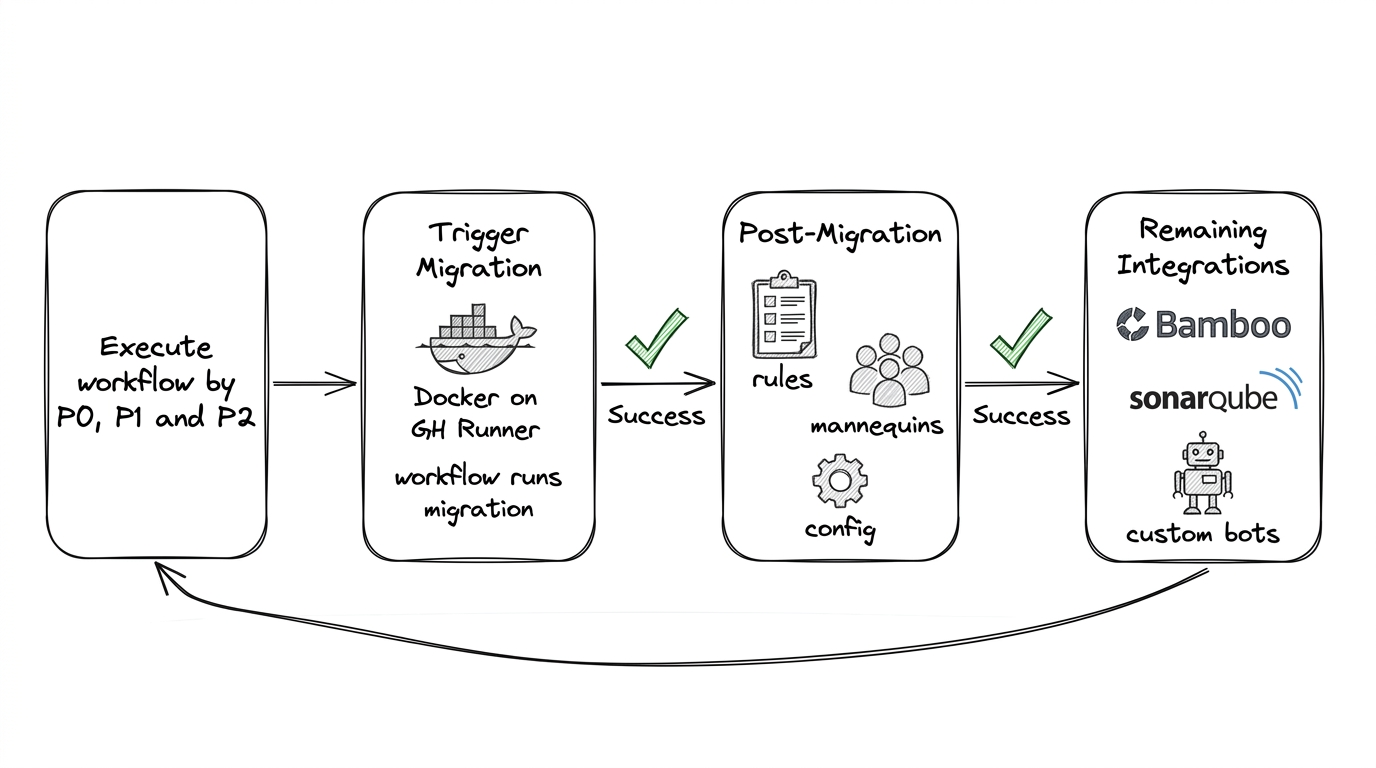
With prep and tools in place, the migration platform could run. Manual migration was never an option at our scale. This automation spans all three phases—pre-migration analysis (Pre-Migration Steps), migration execution (Migration), and post-migration setup (Post-Migration). The platform was built in two layers:
github-migration-tools— Repository of scripts and tools (bbs2gh, validation, repository rules bootstrap). Containerized into a Docker image for deterministic runs across local, CI, and engineer machines.github-migration-workflows— Repository of GitHub Actions workflows that orchestrate migration steps. Separation allowed iterating on scripts without changing workflow structure, and vice versa.
1.1 Workflow Catalog
The workflows repository contained a set of purpose-built GitHub Actions workflows, each handling a specific phase of the migration lifecycle:
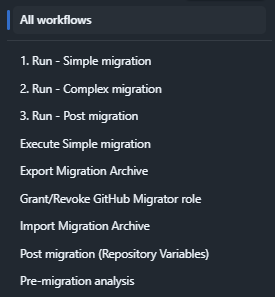
| Workflow | Purpose |
|---|---|
| Pre-migration analysis | Collect repo stats (git-sizer, git-filter-repo, branch/PR/tag counts) |
| Run - Simple migration | End-to-end simple migration (git objects only) |
| Run - Complex migration | End-to-end complex migration (git + PRs + metadata) |
| Run - Post migration | Execute all post-migration steps for a repo |
| Export Migration Archive | Export archive from Bitbucket Server |
| Import Migration Archive | Import archive into GitHub |
| Grant/Revoke GitHub Migrator role | Manage migrator role for service accounts |
| Post migration (Repository Variables) | Apply per-repo variables (Bamboo keys, Sonar config) |
| Execute Simple migration | Standalone simple migration step |
1.2 Self-Service Dispatch
Migrations were triggered through GitHub Actions' workflow dispatch UI. An engineer selected a workflow, chose the branch (e.g., uem-migrations), and provided inputs:
| Input | Description |
|---|---|
| List of repos (.csv) | CSV file listing repositories to migrate |
| Bitbucket Configuration | Project slug and repo slug (repo slug auto-populated from CSV) |
| GitHub Configuration | Destination repo name (from CSV), GitHub org, Bitbucket instance (test or production) |
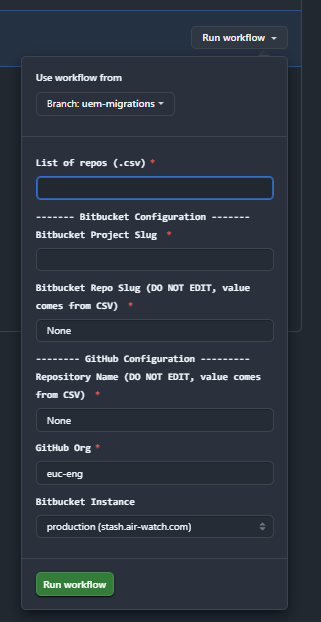
This made migration self-service: any team member with access to the workflows repo could trigger a migration run without writing code or SSH-ing into servers.
1.3 CSV-Driven Batching by Priority
Repositories were organized into CSV files by migration priority, stored in the workflows repo under a structured path:
github-migration-workflows/
  migration/
    project-repos/
      <github-org>/
        P0/
        P1/
        P2/
        Run-P0-PROJ1_Mar8_10AMEST.csv
        Run-P0-PROJ2_Mar8_10AMEST.csv
        ...
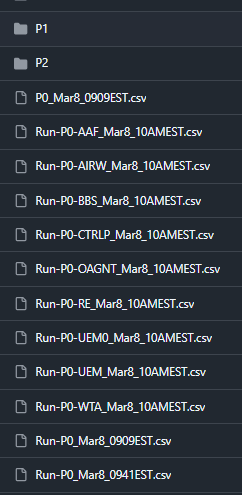
Each CSV listed repositories for a specific Bitbucket project, timestamped by migration run (e.g., Run-P0-AIRW_Mar8_10AMEST.csv). P0 repositories migrated first with the tightest validation; P1 and P2 followed in subsequent batches. This structure gave us full traceability—we could see exactly which repos migrated in which batch, when, and in what order.
1.4 Branch-per-Org Structure
The workflows repository used branches to organize migration data by organization and team. For example, a PROD/UEM branch contained all migration artifacts—CSVs, pre-migration stats, post-migration configs—for that org's repositories. This kept migration data isolated per team and made it easy to track progress across orgs.
Instructions and FAQ for running the migrations are documented in the workflows repository README.
1.5 Building the Migration Platform
With hundreds of repositories to migrate—and other teams watching to adopt the same approach—we needed migration to work as a platform, not a script. We built a migration automation combining the containerized github-migration-tools with the orchestration in github-migration-workflows. The architecture looked roughly like this:
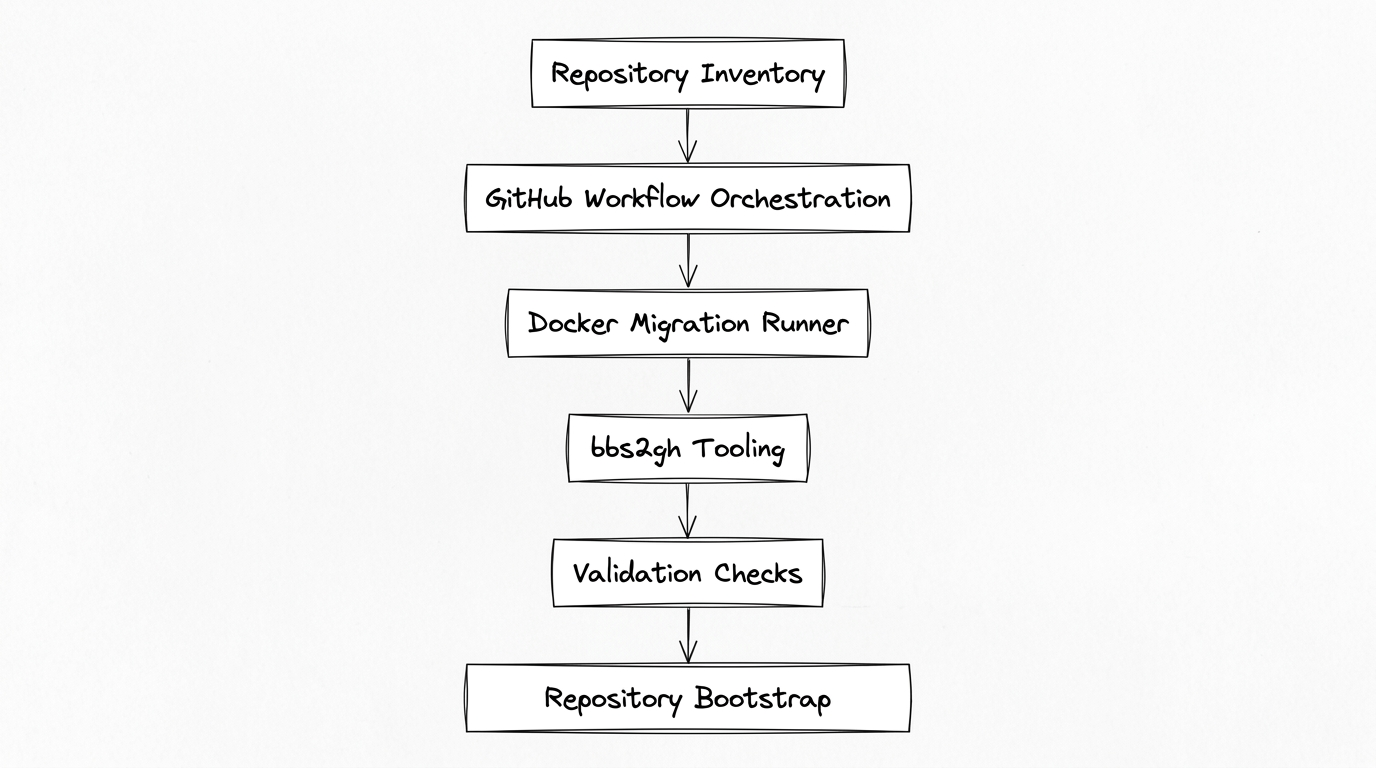
The automation allowed us to run migrations in parallel, retry failures safely, validate repository integrity automatically, and bootstrap repositories with standardized configuration. Migration became a repeatable platform capability rather than a one-time effort.
How we built the migration runner
We ran migrations on Linux (AlmaLinux). The runner hosted a Python orchestration utility and our github-migration-tools Docker image—everything needed for a migration run in one container. We packaged bbs2gh and the GitHub CLI, SSH keys for Bitbucket access (mounted at runtime), and the AWS/Azure CLI for blob storage. The workflows invoked this container; we never ran bbs2gh manually. The architecture looked like this:
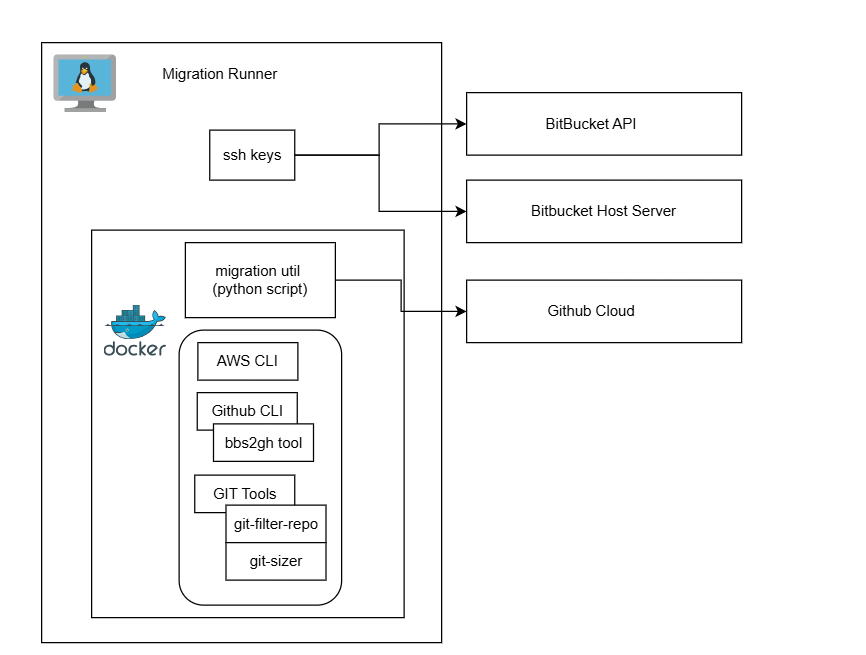
For teams replicating a similar setup, our image included the following. We installed gh and gh-bbs2gh on the base image, configured SSH keys for the Bitbucket service account (key path passed via env or mount), and added the blob storage CLI with credentials at runtime. Reference commands we used for the equivalent bare-host setup:
# GitHub CLI and bbs2gh
sudo dnf install 'dnf-command(config-manager)'
sudo dnf config-manager --add-repo https://cli.github.com/packages/rpm/gh-cli.repo
sudo dnf install gh
gh extension install github/gh-bbs2gh

# SSH for Bitbucket (service account)
ssh-keygen -t ed25519 -f ~/.ssh/id_ghmigration -C "service-account@your-bitbucket-server"
ssh-copy-id -i ~/.ssh/id_ghmigration.pub service-account@your-bitbucket-server
For bbs2gh requirements and the manual gh bbs2gh migrate-repo invocation, see Migration.
1.6 Dry Runs, Gotchas, and Lessons Learned
GitHub's migration documentation recommends performing a dry run for every repository. We took this seriously: every P0 and P1 repository went through a full dry run well ahead of the migration weekend. A dry run is a real migration to a temporary destination repo that gets deleted afterward—same tools, same automation, same validation. P2 (low-activity) repositories skipped individual dry runs since their risk profile was lower and failures could be retried without time pressure.
Dry runs and the scale migration itself surfaced a set of gotchas that would have derailed the weekend if we hadn't caught them early:
1. Bitbucket archive creation is fragile. Archive creation on Bitbucket Server failed intermittently—network timeouts, server load, and the single-archive-at-a-time constraint all contributed. We added retries with exponential backoff to the automation, and pre-created archives for low-activity repos days before the migration weekend. Don't assume archive creation will succeed on the first attempt.
2. One archive at a time is a hard constraint. Bitbucket Server creates only one archive at a time. With hundreds of repos, this became our biggest bottleneck. The workaround—pre-creating archives in the days before migration—was critical to making the weekend timeline work.
3. Comment threading loses depth. bbs2gh does not preserve arbitrarily deep comment nesting. Linked comment trees—comments on comments on comments—were flattened to two or three levels. The content was preserved, but the threading structure was not always identical. For most teams this was acceptable, but it's worth communicating before migration so nobody is surprised when reviewing old PRs.
4. GitHub APIs return 500s and throttle aggressively. During the scale migration, we hit GitHub API rate limits and intermittent 500 errors—especially during post-migration steps like mannequin reclamation and repository rules bootstrap. Our workaround: rotate across multiple service accounts to distribute API calls, and build retry logic into every API interaction. A single PAT will not carry you through hundreds of repositories.
5. Access coordination takes longer than you think. Getting the right permissions across Bitbucket, GitHub, blob storage, and SSH took weeks of back-and-forth with security, network, infrastructure, and identity teams. Firewall rules for blob storage access, SSH keys for Bitbucket servers, PAT provisioning with the right scopes, SSO configuration for the GitHub org—each required a different team and a different approval process. Start this early—it's on the critical path even though it doesn't feel like "real" migration work.
6. Reflog and gc must run on the source server, not locally.
Running git reflog expire and git gc on a local clone doesn't reclaim space on the Bitbucket server. The server manages Git objects in its own way (packing, replication, storage). Cleanup must target the server directly.
7. Git submodules break silently.
Repositories using git submodules that referenced Bitbucket URLs continued resolving after migration—until the old server was decommissioned. At that point, submodule fetches would fail with no obvious connection to the migration. We added submodule detection to pre-migration analysis to flag these repos, then updated .gitmodules post-migration to point to the new GitHub URLs.
8. Dry runs calibrate your timeline. Beyond catching bugs, dry runs gave us timing data for each repository. We used this to plan parallelism, estimate the weekend schedule, and identify repos that needed extra remediation before the real migration.
1.7 Migration Execution
After weeks of preparation, auditing, and dry runs, the migration platform executed the migration of hundreds of repositories over a single weekend. We made all source repositories read-only during the migration to prevent new commits and ensure a consistent snapshot. The migration preserved complete git commit history, pull requests and reviews, comments and discussions, and authorship information. Where historical contributors did not map directly to GitHub accounts, GitHub mannequins preserved attribution until identities could be reconciled. Migration logs and validation checks ensured that repositories were migrated correctly.