Post-Migration — Source Migration: Bitbucket to GitHub
Post-Migration
Table of Contents
- 1. Post-Migration
- 1.1 Reclaiming User Identities (Mannequins)
- 1.2 Post-Migration Configuration: The Template
- 1.3 Repository Rules Bootstrap
- 1.4 Bamboo and GitHub Integration
- 1.4.1 Bamboo Plan Changes
- 1.4.2 GitHub Repository Variables
- 1.4.3 PR Bot Workflow Propagation
- 1.4.4 Build Status Webhook
- 1.4.5 Build Status Reporting Flows
- 1.5 SonarQube and GitHub Integration
- 1.6 Updating Git Submodules
- 2. Day of Migration
- 3. Developer Onboarding
- 3.1 Getting Started
- 3.2 Developer View and Dashboard
- 3.3 Bitbucket to GitHub: What Changed
- 3.4 Pull Request Workflow
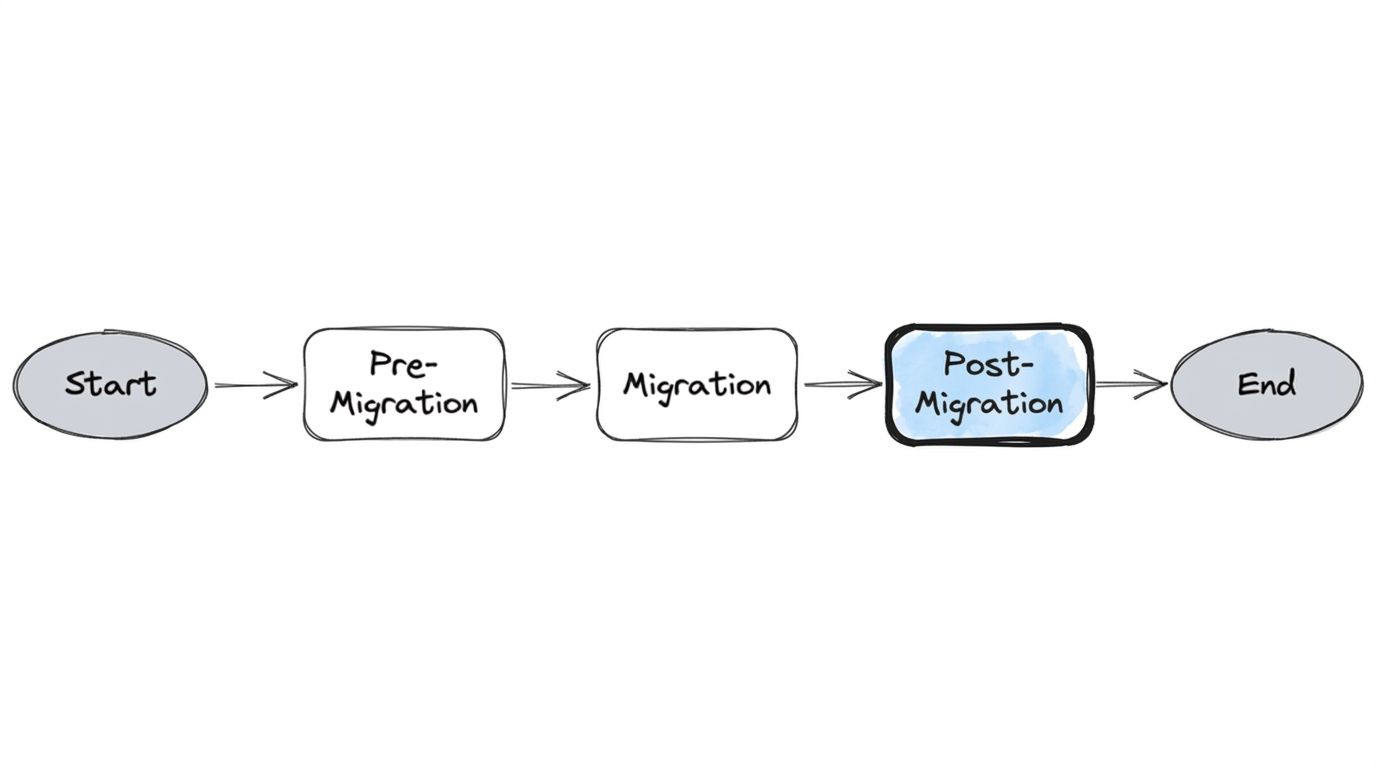
Once repositories landed in GitHub, the work was not done. Post-migration focused on making each repository fully operational: identity reconciliation, post-migration configuration (the template), repository rules (CODEOWNERS, branch protection), Bamboo and GitHub integration (build status, PR bot workflows), SonarQube reconfiguration, and developer onboarding. The sections below follow that flow.
1. Post-Migration
1.1 Reclaiming User Identities (Mannequins)
When GitHub imports repositories, historical commit authors and PR participants that don't match a GitHub account are represented as "mannequins"—placeholder identities that preserve attribution. Organization admins can associate these mannequins with real GitHub accounts through the Organization Settings UI or via the GitHub Enterprise Importer CLI. We automated this using the user mappings collected during pre-migration, so the bulk of identity reconciliation happened without manual intervention.
1.2 Post-Migration Configuration: The Template
Our automation used a post-migration-inputs.json file—a structured configuration that defined everything needed to make each migrated repository fully operational.
The file was organized by Bitbucket project slug as the top-level key, with two levels of configuration:
Project-level defaults — settings shared by all repos under a Bitbucket project:
{
  "PROJ": {
    "default": {
      "rename_master_to_main": "True",
      "default_branch_name": "main",
      "teams": {
        "admin": ["g-platform-engineering"]
      },
      "secrets": {
        "BAMBOO_SERVICE_ACCOUNT_USER": "os.getenv('BAMBOO_USER')",
        "BAMBOO_SERVICE_ACCOUNT_PASSWORD": "os.getenv('BAMBOO_PASS')",
        "SVC_BOT_GITHUB_PAT": "os.getenv('GH_TOKEN')"
      }
    }
  }
}
Per-repo overrides — repo-specific variables that connect each repository back to its CI and quality pipelines:
{
  "PROJ": {
    "service-repo": {
      "variables": {
        "BAMBOO_MAIN_PLAN_KEY": "PLAN-KEY",
        "CHILD_PLAN_KEYS": [""],
        "BAMBOO_SPEC_ENABLED": "False",
        "EXISTING_BAMBOO_LINKED_REPO_NAME": ["ServiceRepo"],
        "BAMBOO_LINKED_REPO_ID": "4893056739",
        "SONAR_DEFAULT_BRANCH": "main"
      }
    }
  }
}
This structure mapped the Bitbucket project hierarchy into GitHub's org and team model. For each project slug, the default block set branch policy (rename the default branch to main), team ownership (which GitHub team gets admin), and shared secrets. Each repo entry then added its specific Bamboo plan keys, linked repo IDs, and SonarQube branch configuration.
The Post migration (Repository Variables) workflow consumed this JSON and applied all settings automatically per repo. This is what ensured Bamboo builds continued triggering against the right GitHub repository, SonarQube analysis pointed to the correct branch, and team ownership was correctly assigned—all without manual intervention.
Building this configuration was one of the most time-consuming parts of pre-migration. Every repo's Bamboo plan key, linked repo name, and Sonar branch had to be collected and mapped. But the payoff was immediate: when the migration weekend arrived, post-migration was fully automated.
1.3 Repository Rules Bootstrap
Repositories were bootstrapped with repository rules configuration extracted during pre-migration—applied at the appropriate scope (repository, team, org, or company): team permissions, CODEOWNERS definitions, and branch protection rules. CODEOWNERS files define who must review changes to specific paths; we generated these from the mandatory reviewer rules captured during pre-migration. Branch protection enforced the same merge policies (required reviewers, status checks) that existed in Bitbucket. From a developer's perspective, repositories appeared in GitHub with familiar review workflows already in place. This was not accidental—it was the result of the config-driven automation we built during pre-migration and the template described in 1.2.
1.4 Bamboo and GitHub Integration
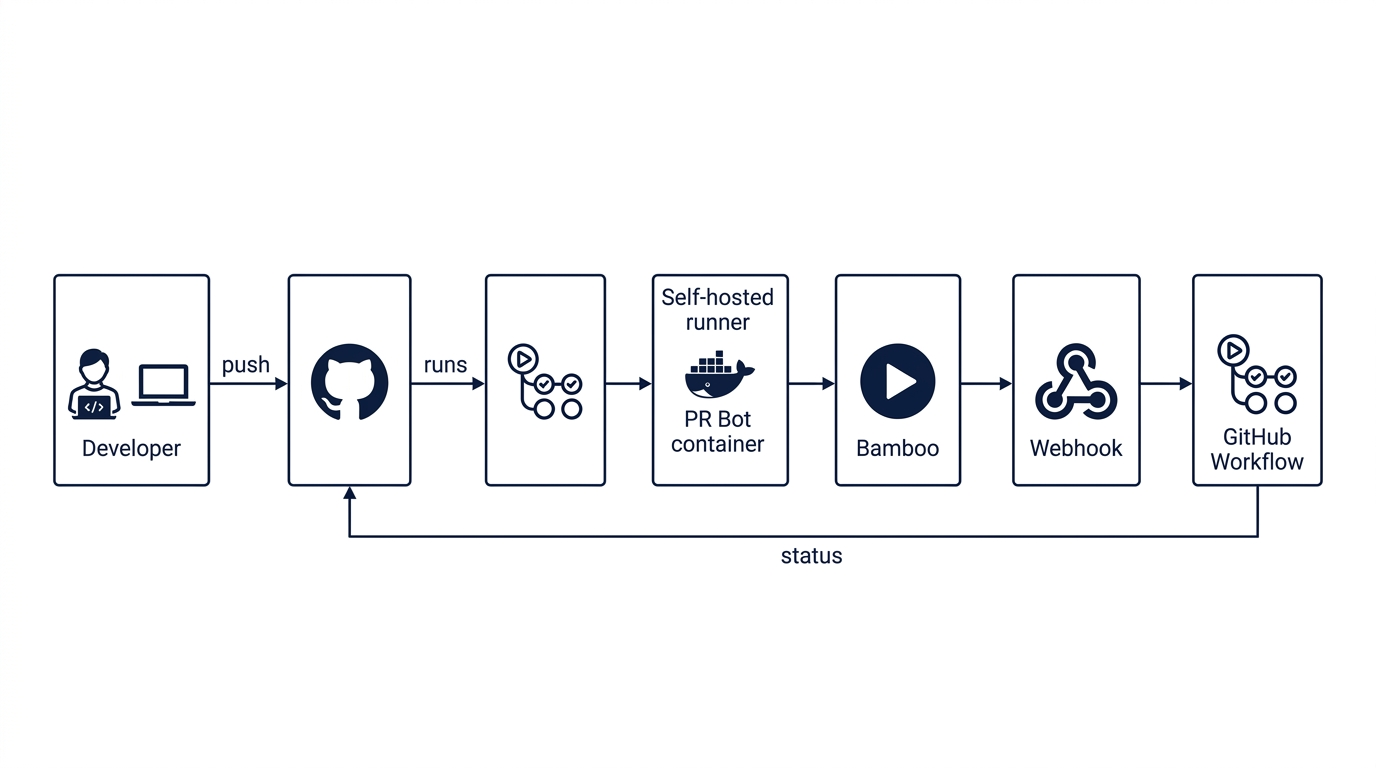
Once repositories were in GitHub, Bamboo build plans and GitHub repositories had to be reconfigured so CI continued to work. This involved changes on both sides—Bamboo plans and GitHub repo variables—plus workflow propagation and build status reporting.
1.4.1 Bamboo Plan Changes
For every build plan that previously used Bitbucket as the source:
- Remove Bitbucket PR bot — The Bitbucket PR bot was no longer needed; its behavior was replaced by a GitHub workflow.
- Change source repository — Update the plan's linked repository from the Bitbucket URL to the new GitHub repository URL.
- PreHook (first stage) — Add a
curlcommand to trigger a webhook that reports build statusInProgressto GitHub when the build starts. - PostHook — Enable PostHook configuration for all plans so build completion (success/failure) is reported back to GitHub.
These changes applied to both specs-enabled and non-specs plans; the difference was in the GitHub repo variables (see below).
1.4.2 GitHub Repository Variables
Each GitHub repository needed variables that connect it to its Bamboo build plan:
| Variable | Specs-enabled plans | Non-specs plans |
|---|---|---|
MAIN_PLAN_KEY | Plan key | Plan key |
BAMBOO_SPEC_ENABLED | True | False |
LINKED_REPO_ID | Bamboo linked repository ID | Bamboo linked repository ID |
We created a mapping (the post-migration-inputs.json in 1.2) as the source of truth for these key-value pairs.
| Option | Approach |
|---|---|
| 1. Automated | Post migration (Repository Variables) workflow applied them automatically |
| 2. Manual | Check in variables once repos are migrated |
We chose automation so all repos were configured consistently.
1.4.3 PR Bot Workflow Propagation
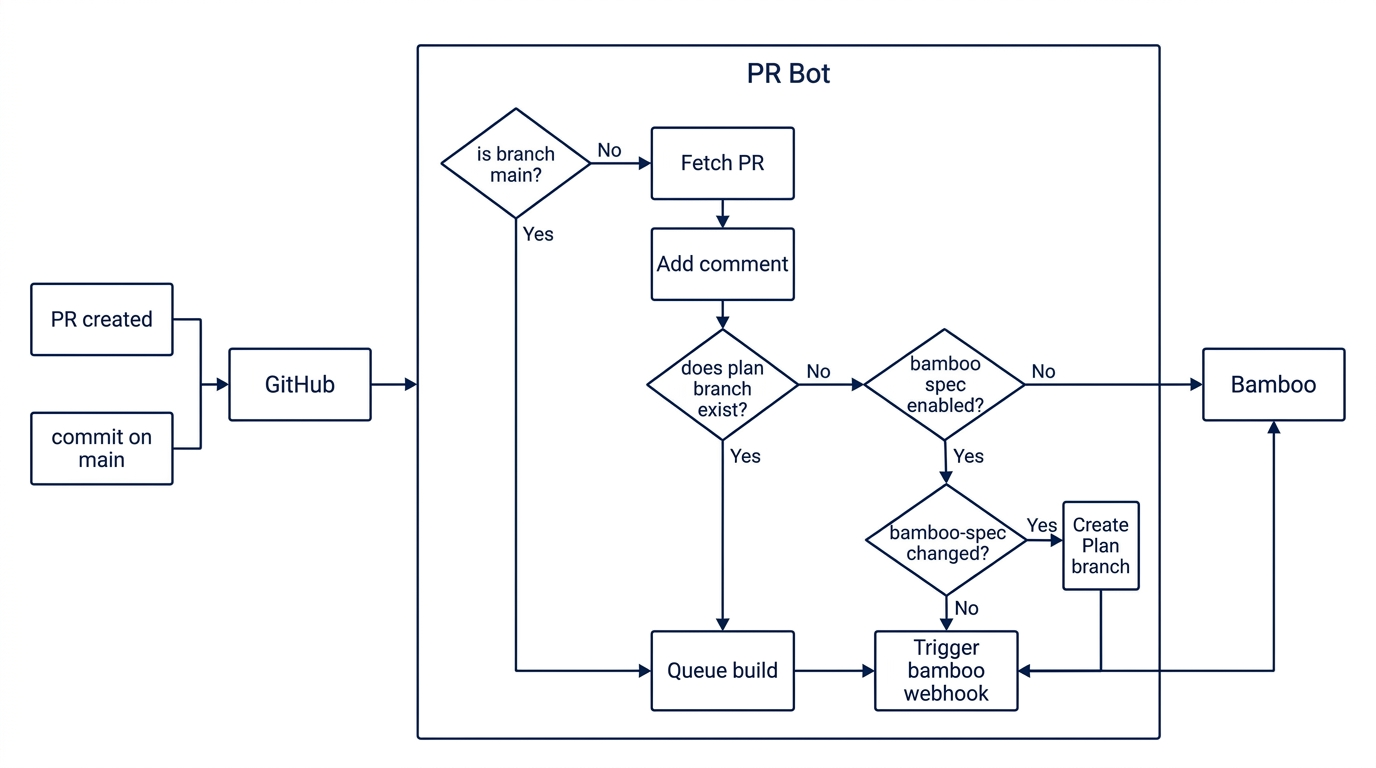
A PR bot workflow adds component reviewers to PRs by default—replacing the Bitbucket PR bot behavior. This workflow had to be present in every migrated repository.
| Option | Approach |
|---|---|
| 1. Org-level template | Repository template enforced at org level; new or migrated repos get the workflow automatically |
| 2. Automation | Create PRs in all repos to add the workflow and merge them |
We used automation for existing repos; org-level templates helped for new repos going forward.
1.4.4 Build Status Webhook
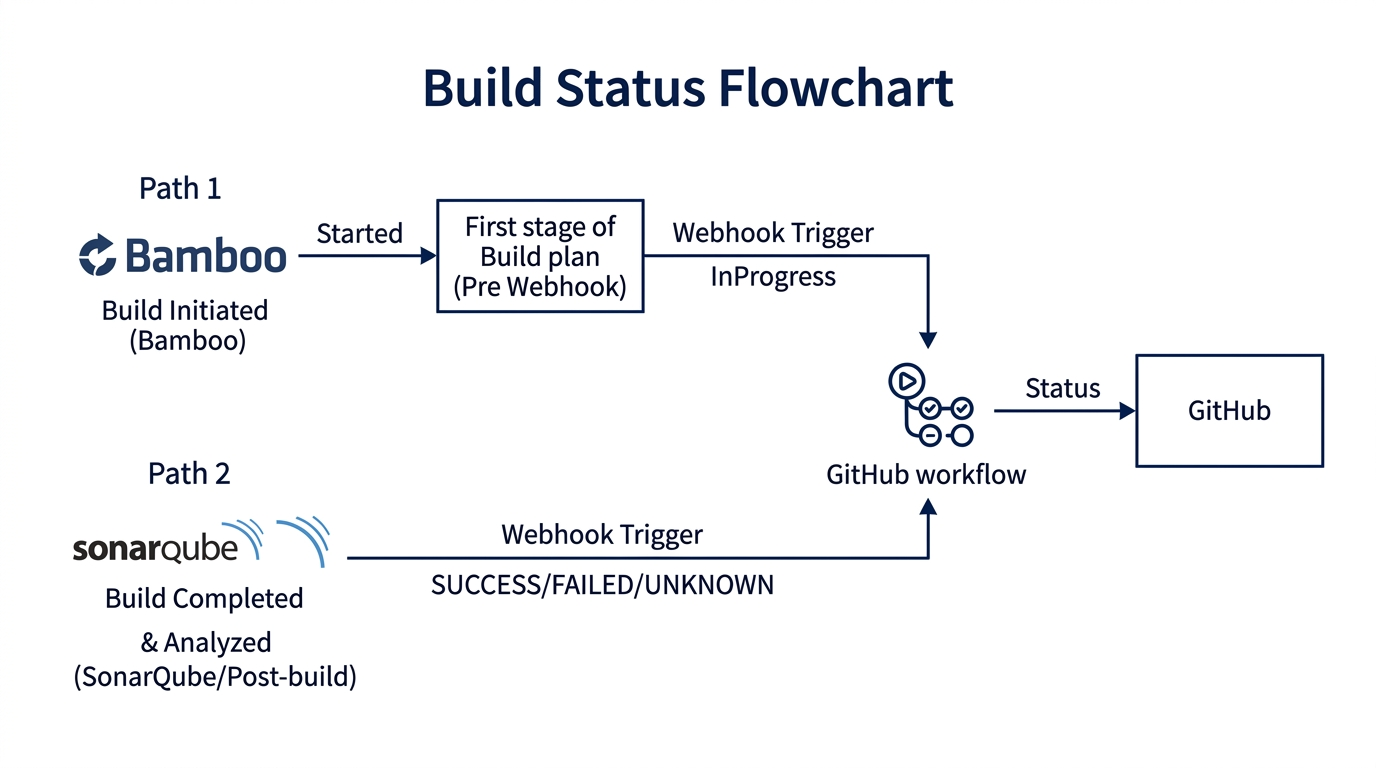
Bamboo reports build status to GitHub via a repository_dispatch webhook: a workflow listens for the event, Bamboo triggers it from PreHook/PostHook, and the workflow updates the PR. Our implementation used a payload like this:
curl -X POST "https://api.github.com/repos/<org>/<build-status-workflow-repo>/dispatches" \
  --header 'Accept: application/vnd.github+json' \
  --header 'Authorization: Bearer <TOKEN>' \
  --header 'Content-Type: application/json' \
  --data '{
    "event_type": "build_status",
    "client_payload": {
      "build_result_url": "<bamboo-build-url>",
      "context": "<plan-name>",
      "commit_id": "<commit-sha>",
      "build_status": "InProgress",
      "build_plan_key": "<plan-key>",
      "build_number": "<build-number>",
      "repo": "<github-repo-url>"
    }
  }'
The workflow receives this payload and updates the GitHub commit status for the PR. Build status then appears in the PR UI; developers click "Details" to open the Bamboo job.
1.4.5 Build Status Reporting Flows
Different build topologies required different handling:
| Topology | Behavior |
|---|---|
| Stop previous, run latest | Builds kill the previous run and only run the latest commit. Status reported on latest commit. For ad-hoc multi-build runs, last build to complete updates status. |
| Sequential builds | Builds run one after the other. Latest build marks PR as InProgress on new commit. Merge checks require Bamboo status on latest commit. Main builds report on the commit that triggered them. |
1.5 SonarQube and GitHub Integration
SonarQube needed to be reconfigured to use GitHub as the SCM source instead of Bitbucket.
- Create a GitHub App for the organization — see SonarQube DevOps Platform Integration
- Configure SonarQube Administration → Configuration → DevOps Platform Integration with the GitHub App ID, client ID, and client secret
- Provision a service account with SonarQube admin privileges for API-driven updates across projects
Post-migration, the Post migration (Repository Variables) workflow applied per-repo variables like SONAR_DEFAULT_BRANCH (from the template in 1.2) so each project's analysis pointed to the correct branch. PR decoration and quality gates continued working without manual intervention.
1.6 Updating Git Submodules
Repositories that used git submodules referencing Bitbucket URLs needed those references updated to point to the new GitHub URLs. These had been identified during pre-migration analysis. After migration, we updated the .gitmodules files to replace the old Bitbucket paths with their GitHub equivalents. Without this step, submodule fetches would silently fail—or worse, continue pulling from the old server if it was still reachable.
Day of Migration
The migration weekend: what developers experienced and how to get started.
We ran automation for the migration—around 500+ repositories over a single weekend—without any developer disruption. For each repo under migration, the same flow was followed:
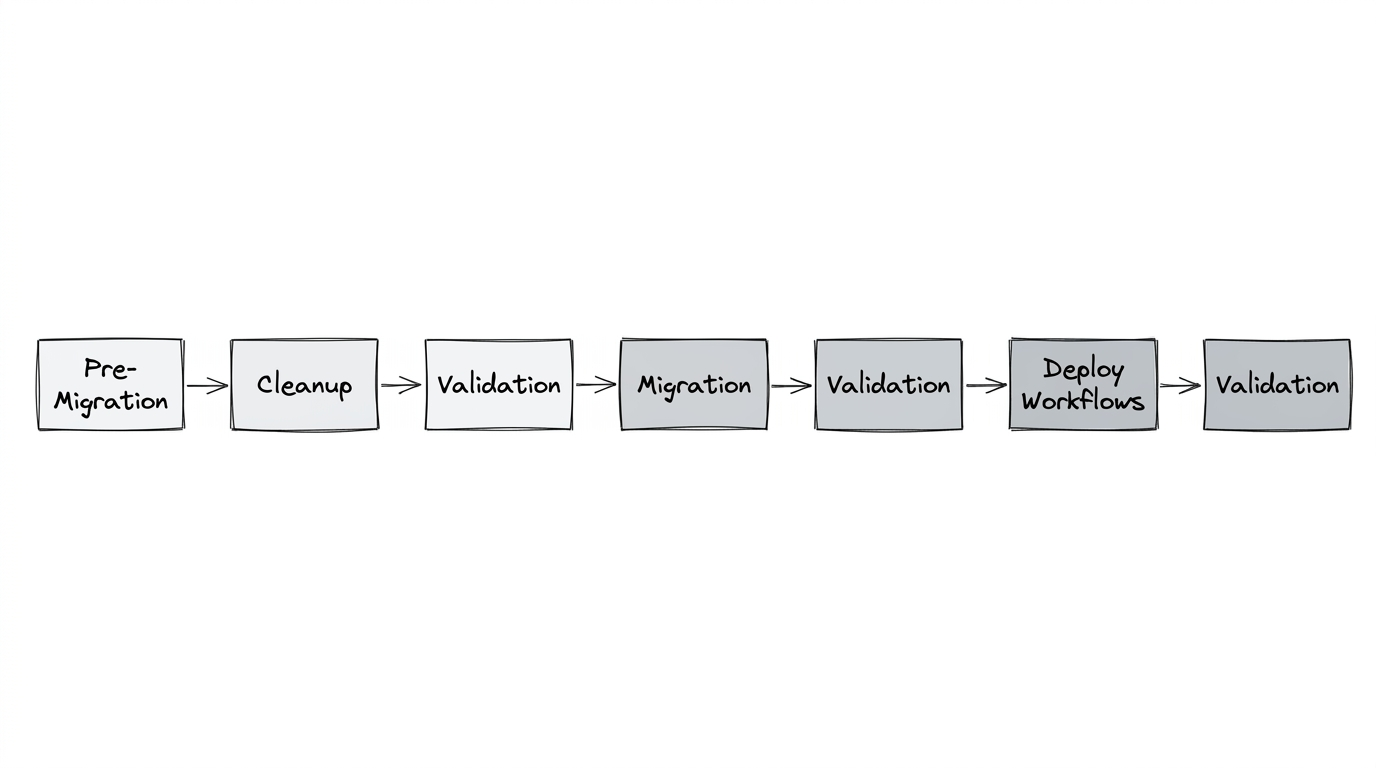
Pre-migration, cleanup, and validation; then migration; then validation again; then deploying workflows; and validation once more. The automation ensured consistency across every repository. One of the most interesting aspects was how invisible it felt to many engineers. After the migration, several developers asked variations of the same question:
"Wait… are we already on GitHub?"
From their perspective, repositories had simply appeared in GitHub with full history, pull requests, and comments intact.
3. Developer Onboarding
For developers we provided onboarding guidance so they could ramp up quickly. Also there was a slack channel for support and troubleshooting to help with any issues.
3.1 Getting Started
Accessing GitHub — Engineers were onboarded to the production GitHub organization. Access is typically granted through your organization's identity or catalog portal (e.g., an internal app catalog). If you're in engineering and cannot access the org, follow your organization's troubleshooting steps—often documented in an internal wiki or self-service portal.
Setting up SSH — You can reuse SSH keys from Bitbucket. Use the table below.
| Step | Action |
|---|---|
| 1. Locate key | ~/.ssh/ (Linux/Mac) or %USERPROFILE%\.ssh (Windows) |
| 2. Add to GitHub | Settings → SSH and GPG keys → New SSH key |
| 3. Paste | Paste the public key. Ensure no trailing newline; key must be a single line. |
| 4. Tools | GitHub for Desktop, VS Code, Git CLI all work with the same credentials once configured. |
# Paths to public key
# Linux/Mac:   ~/.ssh/id_ed25519.pub  or  ~/.ssh/id_rsa.pub
# Windows:    %USERPROFILE%\.ssh\id_ed25519.pub
3.2 Developer View and Dashboard
GitHub provides built-in views for tracking work:
- PRs you created —
github.com/pulls(or your instance's equivalent) - PRs assigned to you —
github.com/pulls/assigned - PRs where you're the reviewer —
github.com/pulls/review-requested
These replace the equivalent Bitbucket PR and dashboard views.
3.3 Bitbucket to GitHub: What Changed
| Aspect | Bitbucket | GitHub |
|---|---|---|
| Repo naming | Project/repo | Repo name only (same as before) |
| Organization | Projects | Single org (no project concept) |
| PRs and history | ✓ | ✓ Migrated |
| Large files in history | Some repos | Few repos had history changed (SHA) |
Note on history changes — In repositories where we removed large files (>100MB) during pre-migration cleanup, commit SHAs changed. Those repos required a fresh clone. For most repos, updating the remote was sufficient: git remote set-url origin <new-github-url>. See Git remote documentation for details.
3.4 Pull Request Workflow
Reviewers — Merge checks and most Bitbucket merge rules were migrated to GitHub and standardized across repositories. A PR bot adds component reviewers by default. Permission to merge (e.g., managers and above) was preserved from Bitbucket.
Build status — Bamboo build status appears in the PR. Click the build "Details" link to open the corresponding Bamboo job in a new tab. (See Bamboo and GitHub Integration above for how this was configured.)
Bamboo and GitHub — Build plans pull from GitHub; commits and PRs link bidirectionally. You can view a commit from Bamboo and jump to the GitHub PR, and vice versa. See GitHub and Bamboo integration for details.
The goal had always been to make the transition feel seamless—and if the migration appeared simple from the outside, it meant the platform engineering work behind it had succeeded.