Lazy Loading Angular Standalone Components Across Nx Libraries
Introduction
Product and engineering teams often need the same view, modal, or component to appear in different places — for example, when visualizing relationships between entities that exist in different Nx monorepo libraries. Reusing the same UI in these contexts keeps behavior and UX consistent, but it can conflict with keeping bundles small and avoiding circular dependencies across Nx libraries.
This article describes a pattern for Lazy Loading Angular Standalone Components from one Nx library into another. This approach enables code splitting and on-demand loading of feature components across library boundaries, so the same component can be rendered in multiple contexts without duplicating logic or pulling heavy dependencies in every consumer.
The Problem
In an Nx Monorepo, we often organize code by domain or feature. Consider the following scenario:
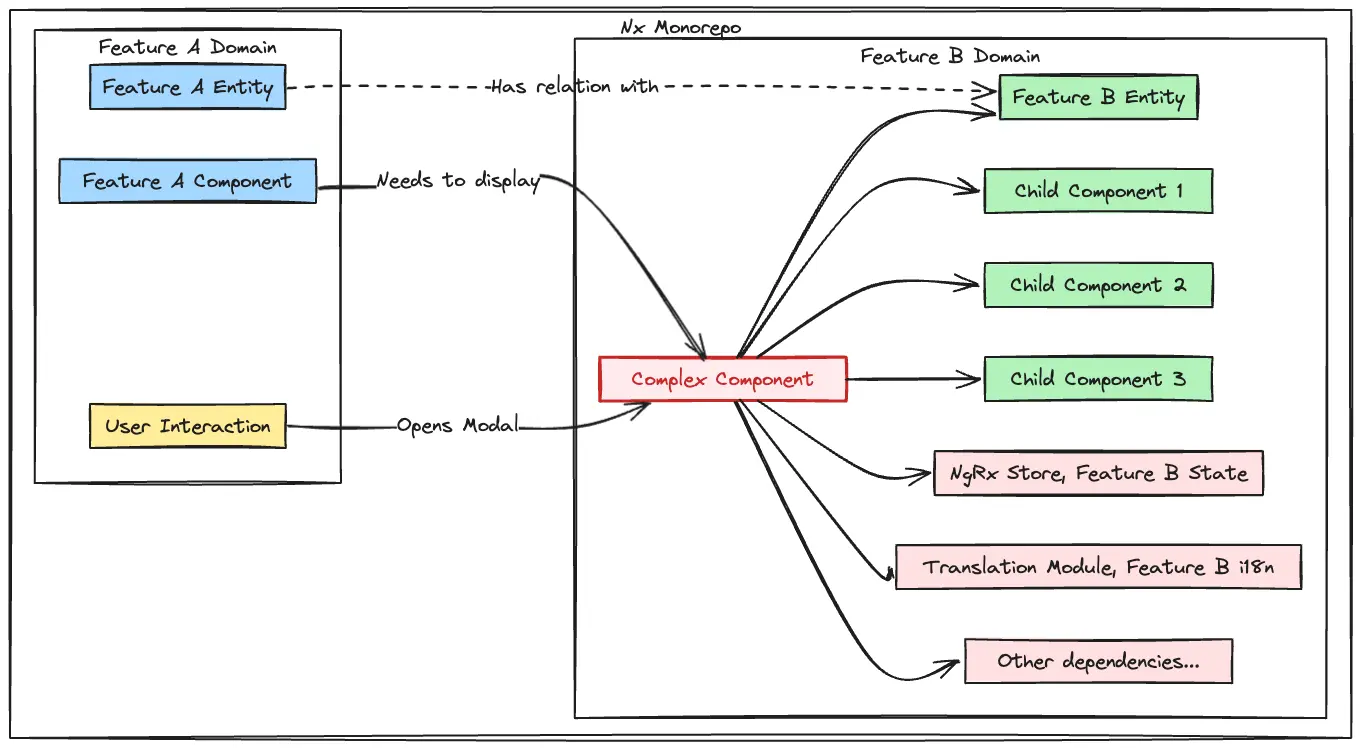
Feature A (libs/feature-a) needs to display a complex component from Feature B (libs/feature-b).
The complex component:
- Has many child components from the same Feature B (
libs/feature-b) and dependencies such as NgRx Store of Feature B, Translation Module, Services, etc. - Comes from a completely different business domain.
- Is only used in specific contexts within Feature A — for example, a modal that is rendered only on specific user interaction, providing domain-specific details for an entity from Feature B that has a relation with a domain entity from Feature A.
Now let's go over the first solutions that come to mind.
Issues with Direct Import
If Feature A directly imports the component from Feature B:
// Direct import creates tight coupling
import { LargeComplexComponent } from '@myorg/feature-b';
Main Problems
-
Cross-domain dependency: Feature A now depends on Feature B, violating domain boundaries. This creates a direct coupling between two separate business domains that should be independent, making it harder to understand dependencies and leading to a tangled architecture where changes in one domain ripple through others.
-
Bundle bloating: The imported component and all of its dependencies—child components, NgRx Store modules, translations, services, and the rest of its dependency graph—get bundled with Feature A, even if the component is only used occasionally. When Vite/esbuild builds the application, it must include that entire dependency tree in Feature A’s bundle, which can be a large portion of Feature B’s code.
-
Tight coupling: Changes in Feature B can break Feature A. Any refactoring, API changes, or structural modifications in Feature B's components require corresponding updates in Feature A, creating a maintenance burden and increasing the risk of breaking changes across feature boundaries.
-
Difficult refactoring: Moving or splitting features becomes harder. Extensibility could suffer. If we want to move Feature B's component to a different library, split it into smaller components, or extract shared functionality, we must update all consuming features like Feature A, making architectural improvements costly and very risky.
-
Slower builds: Feature A must rebuild when Feature B changes. The build system treats Feature B as a dependency of Feature A, so any modification to Feature B's code triggers a rebuild of Feature A, even if the changes don't affect the imported component, slowing down development iteration cycles.
-
Library dependency graph pollution: Creates circular dependency risks as the codebase grows. As more features cross-reference each other (Feature A imports from B, Feature B imports from C, Feature C imports from A), we can create complex dependency graphs that can lead to circular dependencies, making the monorepo increasingly difficult to manage and reason about.
Issues with Shared Feature Library
One might consider extracting the needed components into a shared library (e.g., feature-b-common) to avoid direct cross-domain dependencies. However, this might create new problems:
-
The component dependency chain is often large: The component from Feature B doesn't exist in isolation—it could have a chain of many child components, each with their own templates, styles, and logic. Extracting just the top-level component isn't sufficient; we'd need to move the entire component tree.
-
Library explosion: Creating a dedicated common library per shared feature leads to an ever-growing set of libraries. We end up with
feature-a-common,feature-b-common,feature-c-common, etc., making the monorepo structure increasingly complex and harder to navigate. -
Duplicated dependencies: Each shared library needs to declare its own dependencies (NgRx Store modules, translation modules, etc.). If Feature A's components require Feature B's store state, we now have to decide whether to duplicate that state management in the shared library or create yet another dependency chain.
-
Still bundles everything: Even with a shared library, if Feature A imports from
feature-b-common, all those components and their dependencies still get bundled into Feature A's initial bundle. We haven't solved the bundle bloat problem — we've just reorganized where the code lives. -
Defeats the purpose of domain boundaries: The monorepo structure with separate feature libraries exists to maintain clear domain boundaries and team ownership. Creating shared libraries for domain-specific components undermines this architectural principle, essentially recreating a monolithic structure within the monorepo.
Other Considered Approaches
When considering approaches for lazy loading standalone components with their dependencies (NgRx Store, translation modules, etc.) across Nx libraries, several alternatives exist. Here's a detailed comparison:
1. Direct await import() + EnvironmentInjector
EnvironmentInjector: Angular's hierarchical injector that provides dependency injection context for dynamically created components. Unlike the legacy Injector, it can create standalone components and automatically load their environment (imports array). When we pass an EnvironmentInjector to createComponent(), the new component can access all services and dependencies available in that injector's scope.
Approach:
@Component({
  ...
})
export class FeatureADashboardComponent {
  ...
  // Inject the current environment's EnvironmentInjector
  private readonly envInjector = inject(EnvironmentInjector);
  // Get reference to the template container where we'll render the lazy component
  @ViewChild('previewContainer', { read: ViewContainerRef })
  previewContainer!: ViewContainerRef;
  ...
  public async lazyLoadComponent(entity: Entity): Promise<void> {
    // Step 1: Create an EnvironmentInjector with Feature B's dependencies
    const featureInjector = createEnvironmentInjector([
      provideState(FEATURE_B_STORE_KEY, featureBReducerMap),
      provideEffects(FEATURE_B_EFFECTS),
      importProvidersFrom(TranslateModule.forChild({
        loadBundle,
        localeBundleId: LocaleBundleId.FEATURE_B,
      })),
    ], this.envInjector);

    // Step 2: Dynamically import the component at runtime
    const { FeatureBPreviewComponent } = await import(
      '@myorg/feature-b/components/preview-panel'
    );

    // Step 3: Clear any existing component in the container
    this.previewContainer.clear();

    // Step 4: Create the component imperatively, passing the EnvironmentInjector
    const componentRef = this.previewContainer.createComponent(
      FeatureBPreviewComponent,
      {
        environmentInjector: featureInjector,
        bindings: [
          inputBinding('entityId', entity?.id),
          inputBinding('displayMode', 'modal'),
          outputBinding('closed', () => {
            this.previewContainer.clear();
          }),
        ],
      }
    );
  }
}
Pros:
- Direct control over component instantiation
- Can provide custom injector with specific dependencies
- Works well for one-off lazy loading scenarios (can be abstracted as a service)
Cons:
- Tight coupling to specific component paths
- Manual ViewContainerRef management required
- No built-in caching mechanism
- Difficult to switch components dynamically
2. Angular @defer
Deferrable views, also known as @defer blocks, reduce the initial bundle size by deferring both the loading of the component’s code and its rendering until the block is triggered. You must import the component so the template can reference it, but the Angular compiler detects that it is only used inside a @defer block and emits it (along with its transitive dependencies) into a separate JavaScript chunk that is loaded only when the block is triggered. Those transitive dependencies need not be standalone.
Approach:
@defer (on viewport) {
  <feature-b-component [data]="data" />
} @loading {
  <loading-spinner />
} @error {
  <error-message />
}
Pros:
- Built-in Angular feature, no custom code needed
- Multiple trigger conditions (viewport, interaction, or timer)
- Component dependencies are automatically loaded
Cons:
- Host still has to import the component so the template can reference it, so a compile-time (and Nx) dependency on the other library remains
- No runtime dynamic component selection
- Component must be statically referenced in template
- Component cannot be chosen at runtime from a variable or expression
3. Module Wrappers
Create module wrappers for the lazy-loaded components that encapsulate all of their dependencies.
Approach:
// Feature module wrapper
@NgModule({
  imports: [
    StoreModule.forFeature('feature', featureReducer),
    EffectsModule.forFeature(effects),
    TranslateModule.forChild({...})
  ],
  declarations: [PreviewComponent],
  exports: [PreviewComponent]
})
export class PreviewModule {
  // Method to resolve the component type
  resolveComponent() {
    return PreviewComponent;
  }
}

// Usage
async loadComponent(elementRef: ElementRef, props: any) {
  //  Dynamic import the module
  const module = await import('@myorg/feature-b/preview.module');

  // Create module instance with parent injector
  const moduleRef = createNgModule(module.PreviewModule, this.injector);

  //  Get component type from module
  const componentType = moduleRef.instance.resolveComponent();

  // Create component with module's injector passed to
  // Angular's createComponent() function from @angular/core
  const componentRef = createComponent(componentType, {
    hostElement: elementRef.nativeElement,
    environmentInjector: moduleRef.injector
  });

  // Attach to Angular change detection
  this.appRef.attachView(componentRef.hostView);

  // Set input properties
  componentRef.setInput('entityId', props.entityId);
  componentRef.setInput('displayMode', props.displayMode);

  // Listen to outputs
  componentRef.instance.closed.subscribe(() => {
    componentRef.destroy();
  });

  return componentRef;
}
Pros:
- Dependencies bundled with a wrapper module
- Clear boundary for feature code
- Well-established pattern in older Angular apps
Cons:
- Going against Modern Angular's direction of moving to standalone components
- Module metadata overhead — larger bundle size
4. Web Components (Custom Elements)
Custom Elements—Angular components packaged as custom elements (also called Web Components) — are a web standard for defining new HTML elements in a framework-agnostic way.
Approach:
@Component({
  selector: 'app-feature-a',
  schemas: [CUSTOM_ELEMENTS_SCHEMA],
  template: `
    <button (click)="loadPreview()">Load Preview</button>
    <app-preview [attr.data]="data"></app-preview>
  `,
})
export class FeatureAComponent {
  private injector = inject(Injector);
  public data = 'some-value';

  async loadPreview() {
    if (customElements.get('app-preview')) return;

    const featureInjector = createEnvironmentInjector([
      provideState(FEATURE_B_STORE_KEY, featureBReducers),
      provideEffects(FEATURE_B_EFFECTS),
      importProvidersFrom(TranslateModule.forChild({...})),
    ], this.injector);

    const { PreviewComponent } = await import('@myorg/feature-b');
    const PreviewElement = createCustomElement(PreviewComponent, {
      injector: featureInjector
    });
    customElements.define('app-preview', PreviewElement);
  }
}
Pros:
- Framework-agnostic, can be used outside Angular (or in apps with older Angular versions)
- True encapsulation via Shadow DOM
- Can be lazy loaded via native browser APIs
Cons:
- Doesn't eliminate cross-domain dependencies
- Dependencies must be pre-loaded — NgRx Store needs to be available in parent injector or an EnvironmentInjector has to be created similar to Approach 1
- More complex props binding and event handling
- Limited Angular template features (no structural directives)
- Change detection challenges — may require manual triggers
The Solution: Lazy Load Service + Lazy Container
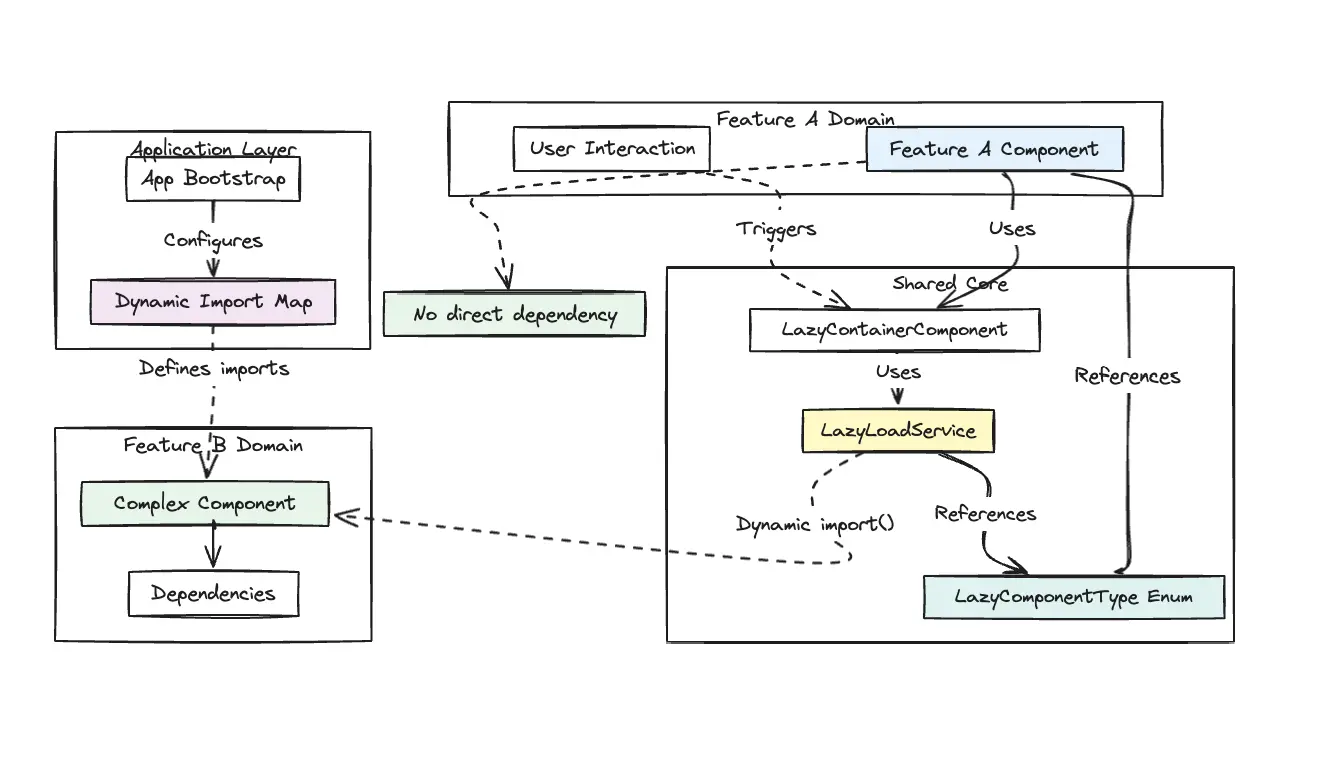
A signal-based lazy loading service that decouples feature libraries by:
-
Breaking domain dependencies: Feature A doesn't directly import from Feature B, instead referencing components through an enum-based abstraction. This eliminates cross-domain coupling at the library level, allowing features to evolve independently.
-
Loading on-demand: Components are only loaded when explicitly requested through user interaction or navigation, not bundled with the initial application. The dynamic import mechanism downloads the component's JavaScript chunk from the server only when needed, keeping the initial bundle lean.
-
Centralizing configuration: The application layer maintains a single import map that defines all lazy-loadable components and their locations. This creates one source of truth for component loading configuration.
-
Caching loaded components: Once a component is loaded, its type is cached in a Signal and reused for subsequent requests. This prevents redundant network requests and re-parsing of the same JavaScript code.
-
Using Angular signals: The pattern leverages Angular's reactive primitives (signals, computed) for managing component loading state. Signals provide automatic change detection integration and clear data flow.
Architecture Benefits
Instead of Feature A → Feature B dependency, the pattern creates:
- Feature A → Shared Core (where lazy load service resides)
- Feature B → (Standalone, Independent)
- App → Dynamic Import Map (wires everything together)
This inverts the dependency, moving cross-domain references to the application boundary where they belong.
Implementation
1. Component Type Enum
Define an enum in your shared models library to represent all lazy-loadable components:
// libs/shared/models/src/lib/enums/lazy-component-type.enum.ts
export enum LazyComponentType {
  FEATURE_DASHBOARD = 'FEATURE_DASHBOARD',
  FEATURE_DETAIL_VIEW = 'FEATURE_DETAIL_VIEW',
  FEATURE_PREVIEW_PANEL = 'FEATURE_PREVIEW_PANEL',
  WIDGET_CHART = 'WIDGET_CHART',
  WIDGET_TABLE = 'WIDGET_TABLE',
}
2. Dynamic Import Map
In your application, create a mapping of component types to dynamic imports:
// apps/main-app/src/app/core/lazy-load/dynamic-import-map.const.ts
import { Type } from '@angular/core';
import { LazyComponentType } from '@myorg/shared/models';

export const DYNAMIC_IMPORT_MAP: Record<LazyComponentType, () => Promise<Type<unknown>>> = {
  [LazyComponentType.FEATURE_DASHBOARD]: () =>
    import('@myorg/feature-a/components/dashboard').then(
      (m) => m.FeatureDashboardComponent,
    ),
  [LazyComponentType.FEATURE_DETAIL_VIEW]: () =>
    import('@myorg/feature-a/components/detail-view').then(
      (m) => m.FeatureDetailViewComponent,
    ),
  [LazyComponentType.FEATURE_PREVIEW_PANEL]: () =>
    import('@myorg/feature-b/components/preview-panel').then(
      (m) => m.FeaturePreviewPanelComponent,
    ),
};
Benefits:
- Centralized configuration of all lazy-loadable components
- Type-safe mapping with enum keys
- Clear dependency boundaries between libraries
- Easy to add new lazy-loadable components
Important: Lazy-loadable standalone components must be self-contained and import all their required dependencies directly in their
importsarray. This includes NgRx Store modules, translation modules, third-party libraries, and any other dependencies. The lazy container only provides the component type and props—it does not inject or provide any services or modules into the lazy component's context.
3. Application Bootstrap
Initialize the service in your application:
// apps/main-app/src/app/app.config.ts
import { ApplicationConfig, APP_INITIALIZER } from '@angular/core';
import { LazyLoadService } from '@myorg/shared/core';
import { DYNAMIC_IMPORT_MAP } from './core/lazy-load/dynamic-import-map.const';

export function initializeLazyLoadService(lazyLoadService: LazyLoadService) {
  return () => {
    lazyLoadService.setComponentImportByType(DYNAMIC_IMPORT_MAP);
  };
}

export const appConfig: ApplicationConfig = {
  providers: [
    // ...other providers
    {
      provide: APP_INITIALIZER,
      useFactory: initializeLazyLoadService,
      deps: [LazyLoadService],
      multi: true,
    },
  ],
};
Note: You can call
setComponentImportByTypedirectly duringapp.component.tsinitialization or insideapp.module.ts.
4. Lazy Load Service
Create a service in your core library that manages component loading:
// libs/shared/core/src/lib/services/lazy-load.service.ts
import { Injectable, signal, Signal, Type } from '@angular/core';
import { LazyComponentType } from '@myorg/shared/models';

@Injectable({
  providedIn: 'root',
})
export class LazyLoadService {
  private importByType: Record<LazyComponentType, () => Promise<Type<unknown>>>;
  private readonly componentTypeCache: Map<LazyComponentType, Signal<Type<unknown> | null>> = new Map();

  /**
   * Configure the dynamic import map
   */
  public setComponentImportByType(importByType: Record<LazyComponentType, () => Promise<Type<unknown>>>) {
    this.importByType = importByType;
  }

  /**
   * Lazy loads component type and caches it. Returns signal of component type.
   */
  public getComponentType(componentType: LazyComponentType): Signal<Type<unknown> | null> {
    if (!componentType) {
      return signal(null);
    }

    // Return cached signal if already loaded or loading
    if (this.componentTypeCache.has(componentType)) {
      return this.componentTypeCache.get(componentType);
    }

    // Create signal for this component type
    const componentType = signal<Type<unknown> | null>(null);

    // Start loading the component
    this.importByType?.[componentType]?.().then((type) => {
      componentType.set(type);
    });

    // Cache the signal
    this.componentTypeCache.set(componentType, componentType);
    return componentType;
  }
}
Key Service Features:
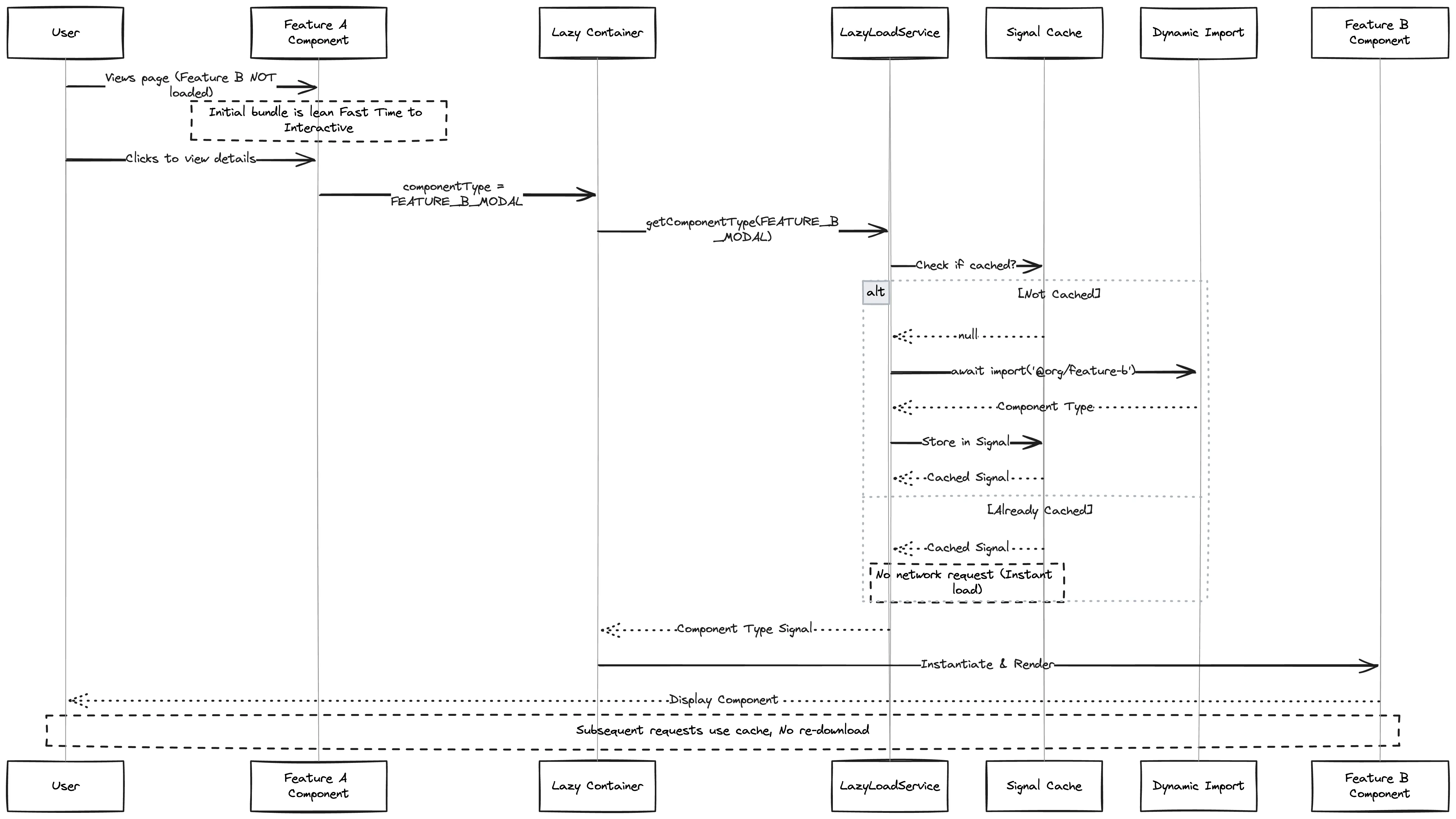
- Signal-based caching: Each component type gets a Signal that updates when loaded
- Single request guarantee: Multiple calls for the same component share the same Signal
- Lazy execution: Dynamic import only happens when
getComponentType()is called
5. Lazy Container Component
Create a container component that renders lazy-loaded components:
// libs/shared/core/src/lib/components/lazy-container/lazy-container.component.ts
import { NgComponentOutlet } from '@angular/common';
import { Component, computed, inject, input } from '@angular/core';
import { LazyLoadService } from '@myorg/shared/core';
import { LazyComponentType } from '@myorg/shared/models';

type ComponentInputs = Record<string, unknown>;

@Component({
  selector: 'app-lazy-container',
  template: `
    @if (loadedComponentType()) {
      <ng-container *ngComponentOutlet="loadedComponentType(); inputs: props()" />
    }
  `,
  imports: [NgComponentOutlet],
})
export class LazyContainerComponent {
  public componentType = input<LazyComponentType>(undefined);
  public props = input<ComponentInputs>(undefined);
  private readonly lazyLoadService = inject(LazyLoadService);

  public readonly loadedComponentType = computed(() => {
    const type = this.componentType();
    return this.lazyLoadService.getComponentType(type)();
  });
}
How the container works:
- Accepts
componentTypeandpropsas Signals - Uses
computed()to reactively get the component type from the Service - NgComponentOutlet instantiates a component type and inserts its Host View into the current one
- Template renders nothing until the component loads
Note: The lazy container component can be extended to handle loading state and output events.
Usage
In Host Component Classes
import { Component } from '@angular/core';
import { LazyContainerComponent } from '@myorg/shared/core';
import { LazyComponentType } from '@myorg/shared/models';

@Component({
  selector: 'app-main-view',
  template: `
    <app-lazy-container
      [componentType]="lazyComponentType"
      [props]="componentProps"
    />
  `,
  imports: [LazyContainerComponent],
})
export class MainViewComponent {
  public readonly lazyComponentType = LazyComponentType.FEATURE_DASHBOARD;
  public readonly componentProps = { entityId: '123' };
}
Dynamic Component Selection
@Component({
  selector: 'app-content-viewer',
  template: `
    <app-lazy-container
      [componentType]="selectedViewType()"
      [props]="viewProps()"
    />
  `,
  imports: [LazyContainerComponent],
})
export class ContentViewerComponent {
  selectedViewType = signal(LazyComponentType.FEATURE_DASHBOARD);
  viewProps = signal({ id: '123' });

  showDashboard() {
    this.selectedViewType.set(LazyComponentType.FEATURE_DASHBOARD);
    this.viewProps.set({ entityId: '123' });
  }

  showDetailView() {
    this.selectedViewType.set(LazyComponentType.FEATURE_DETAIL_VIEW);
    this.viewProps.set({ recordId: '456' });
  }
}
Library Organization
Sample Structure
libs/
  shared/
    models/                       # Shared models and enums
      src/lib/enums/
        lazy-component-type.enum.ts
    core/                         # Core services and components
      src/lib/
        services/
          lazy-load.service.ts
        components/
          lazy-container/
            lazy-container.component.ts
  feature-a/                      # Feature library
    src/lib/
      components/                 # Lazy-loadable components
        dashboard/
          dashboard.component.ts
        detail-view/
          detail-view.component.ts
  feature-b/                      # Feature library
    src/lib/
      components/                 # Lazy-loadable components
        preview-panel/
          preview-panel.component.ts
Sequence Diagram of the flow
Benefits
Bundle Size Optimization
-
Components are split into separate chunks: The build process creates individual JavaScript files for each lazy-loaded component and its dependencies. The browser downloads only the code needed for the current user interaction.
-
Only loaded when needed: Components remain unloaded until explicitly requested by the user through navigation or interaction. Users never download code for features they don't use.
-
Reduces initial bundle size significantly: By deferring non-critical components, the main application bundle can be significantly smaller. Feature A's initial bundle excludes all of Feature B's components, NgRx Store, and Translations until the user explicitly triggers the rendering.
Performance
-
Faster initial page load: With a smaller initial bundle, the browser downloads, parses, and executes less JavaScript upfront.
-
Improved Time to Interactive (TTI) and Total Blocking Time (TBT): Less JavaScript to parse and compile means the main thread is freed up sooner for user interactions.
-
Better Core Web Vitals scores: Lazy loading directly improves Largest Contentful Paint (LCP) and First Input Delay (FID).
Maintainability
-
Clear separation of concerns: Each feature library maintains its own components, state management, and dependencies without creating tight coupling.
-
Centralized configuration: All lazy-loadable components are registered in a single import map at the application level.
-
Easy to add/remove lazy components: Adding a new lazy component requires only three steps: adding an enum value, registering the import in the map, and using the container component.
Developer Experience
-
Simple API for consumers: Developers only need to use
<app-lazy-container [componentType]="..." [props]="...">with zero concern for caching or dynamic import mechanics. -
Signal-based reactivity: Promotes Modern Angular practices and aligns with Angular's direction away from RxJS observables for simple state.
-
Works with Angular's built-in NgComponentOutlet: Ensures compatibility with Angular's Change Detection, lifecycle hooks, and dependency injection.
Testing Strategy
Testing the Service
The LazyLoadService can be tested by mocking the component import map and verifying signal behavior.
Key Testing Patterns:
- Use Vitest's async utilities: Use native async/await with
vi.waitFor()to wait for the signal to resolve, orvi.useFakeTimers()+await vi.runAllTimersAsync()when timers are involved. - Test signal initial state: Verify that signals initially return
nullbefore the dynamic import completes. - Test signal resolution: Use
await vi.waitFor(() => componentType() !== null)to wait for the promise to resolve, then verify the signal contains the expected component type. - Test caching behavior: Call
getComponentType()multiple times with the same enum value and verify the same signal instance is returned (referential equality). - Test multiple components: Verify that different component types get different signals and each resolves correctly.
- Mock the import map: Provide a mock import map with
Promise.resolve()returning mock component classes to avoid actual module imports during tests.
Testing the Container
The LazyContainerComponent can be tested by mocking the LazyLoadService and verifying that it correctly renders components based on signal values.
Key Testing Patterns:
- Mock the LazyLoadService: Use Vitest Spies to mock the service and control what signals are returned.
- Use signal mocks: Create mock signals using
signal()to simulate the async loading behavior without actual imports. - Test computed signal behavior: Verify that the
loadedComponentTypecomputed signal correctly derives its value from the service signal. - Test input changes: Use
fixture.componentRef.setInput()to update component inputs and verify re-computation. - Test reactive updates: Change the mock signal value and verify the computed signal updates reactively.
- Test null/undefined handling: Verify the component handles missing or undefined component types gracefully.
- Test component switching: Verify that changing the
componentTypeinput causes the container to load a different component.
Conclusion
This Lazy Loading Service & Container pattern provides a clean, maintainable solution for loading components across Nx library boundaries. It leverages Angular's modern features (Signals, Standalone Components, and NgComponentOutlet) while maintaining type safety and developer productivity.
The pattern scales well from simple use cases to complex scenarios with many lazy-loaded components across multiple libraries in an Nx monorepo.
Happy Lazy Loading!